
Key takeaways
- MaintWiz is an AI CMMS built for TPM: all eight pillars, 5S, OEE, Kaizen and one point lessons on one equipment list.
- Every pillar has its own module and dashboard, so a plant head can click from the programme view to the record behind any number.
- Operators raise tags on a phone, tags convert to work orders, IoT signals can raise work orders automatically and safety runs through ePTW.
- The whole of Total Productive Maintenance rolls out in 6 to 8 weeks, with Excel uploads and guided project management from the MaintWiz implementation team.
TPM software
TPM software for all eight pillars
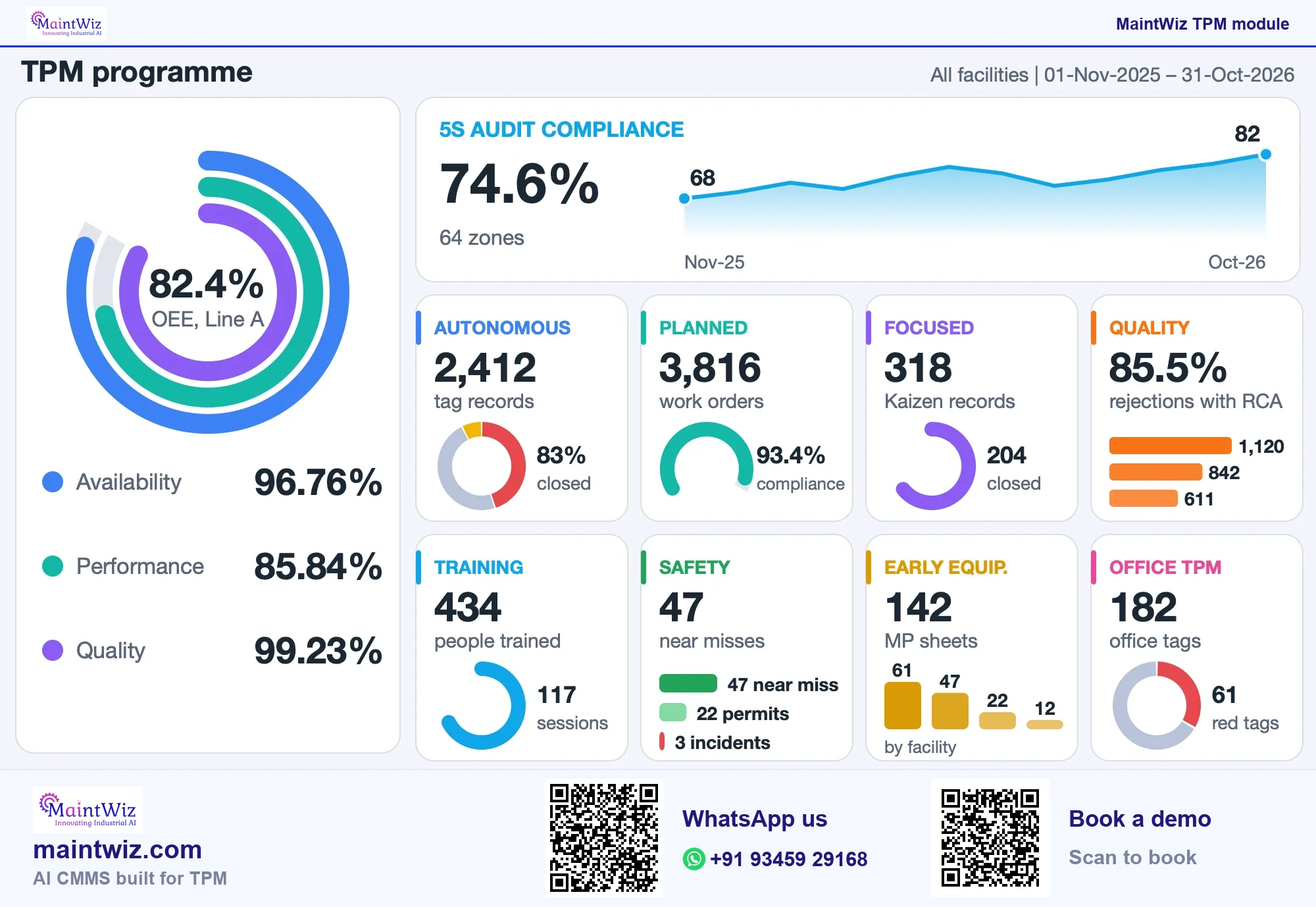
MaintWiz runs every pillar JIPM defines, on a 5S foundation, in one AI CMMS: autonomous maintenance (Jishu Hozen), focused improvement (Kobetsu Kaizen), planned maintenance, quality maintenance, education and training, safety, health and environment, early equipment management and office TPM. Kaizen, one point lessons, OEE and ePTW sit on the same equipment list, so work orders and every pillar's records stay together.
It connects to SAP PM and MM through web services (SAP integration). TPM software means a CMMS that runs all eight pillars on one equipment list, and MaintWiz TPM software gives each pillar its own module and dashboard. Pricing is quoted on request for the modules and users you need: get a quote or see how TPM software is priced.
TPM applies from steel and cement to pharma, food and automotive: see TPM by industry. It is practised worldwide: JIPM's archive lists 1,569 TPM award entries from 54 countries outside Japan for 2006 to 2025, and the award winners by country tables show where, with market pages for China, Thailand, Vietnam and Indonesia, Latin America and Turkey and Europe.
Downloads
TPM readiness workbook, 90-day roadmap and KPI templates (Excel and PDF)
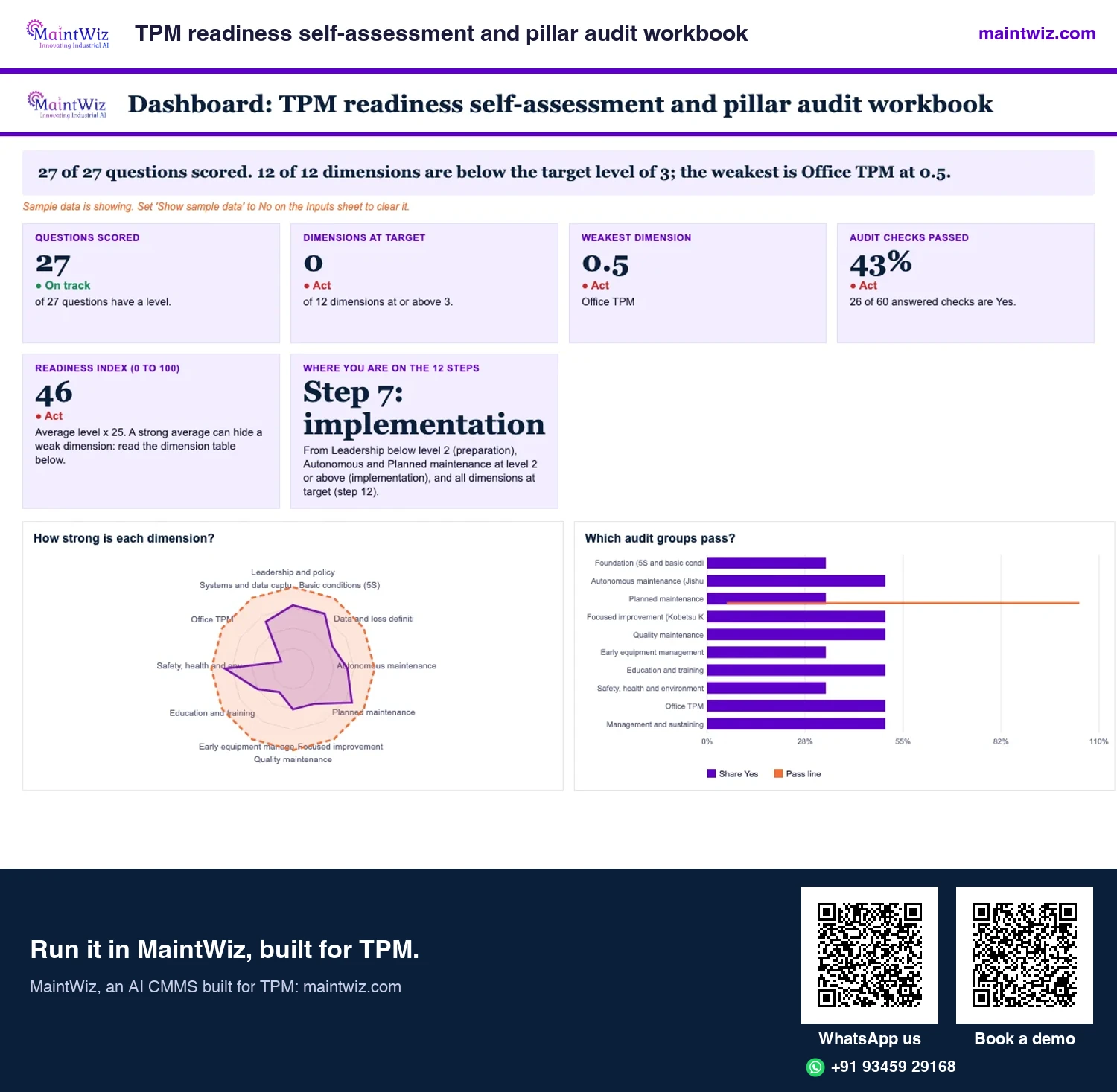
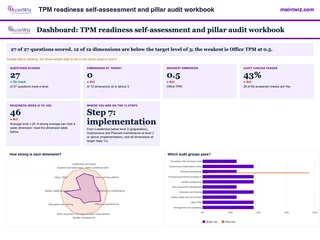 ExcelTPM readiness self-assessment and pillar audit workbook
Score 27 questions across 12 dimensions, read a readiness index from 0 to 100 and your place on the 12 steps
- Sheets
- Dashboard, Inputs, Assessment, Scale, Pillar rubric, Pillar audit, Plant Head page, Read me
- A4
- Version
- v1.0, 2 November 2026
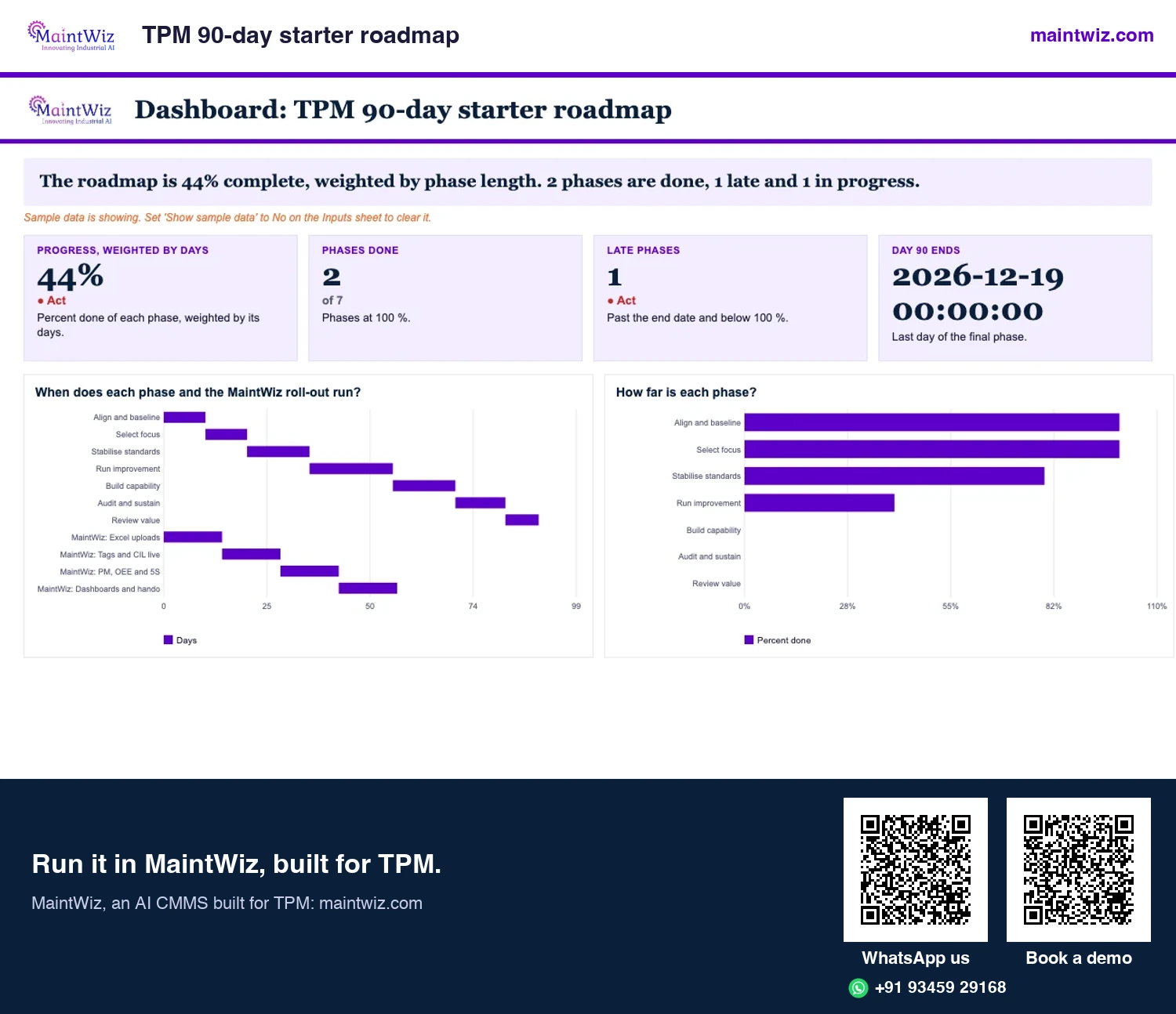
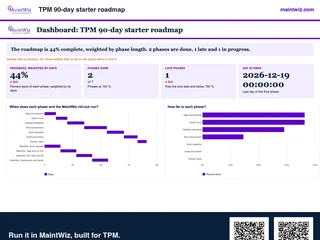 ExcelTPM 90-day starter roadmap
Seven dated phases for the first 90 days, with the 6 to 8 week MaintWiz roll-out running as a second lane
- Sheets
- Dashboard, Inputs, Roadmap, Read me
- A4
- Version
- v1.1, 4 November 2026
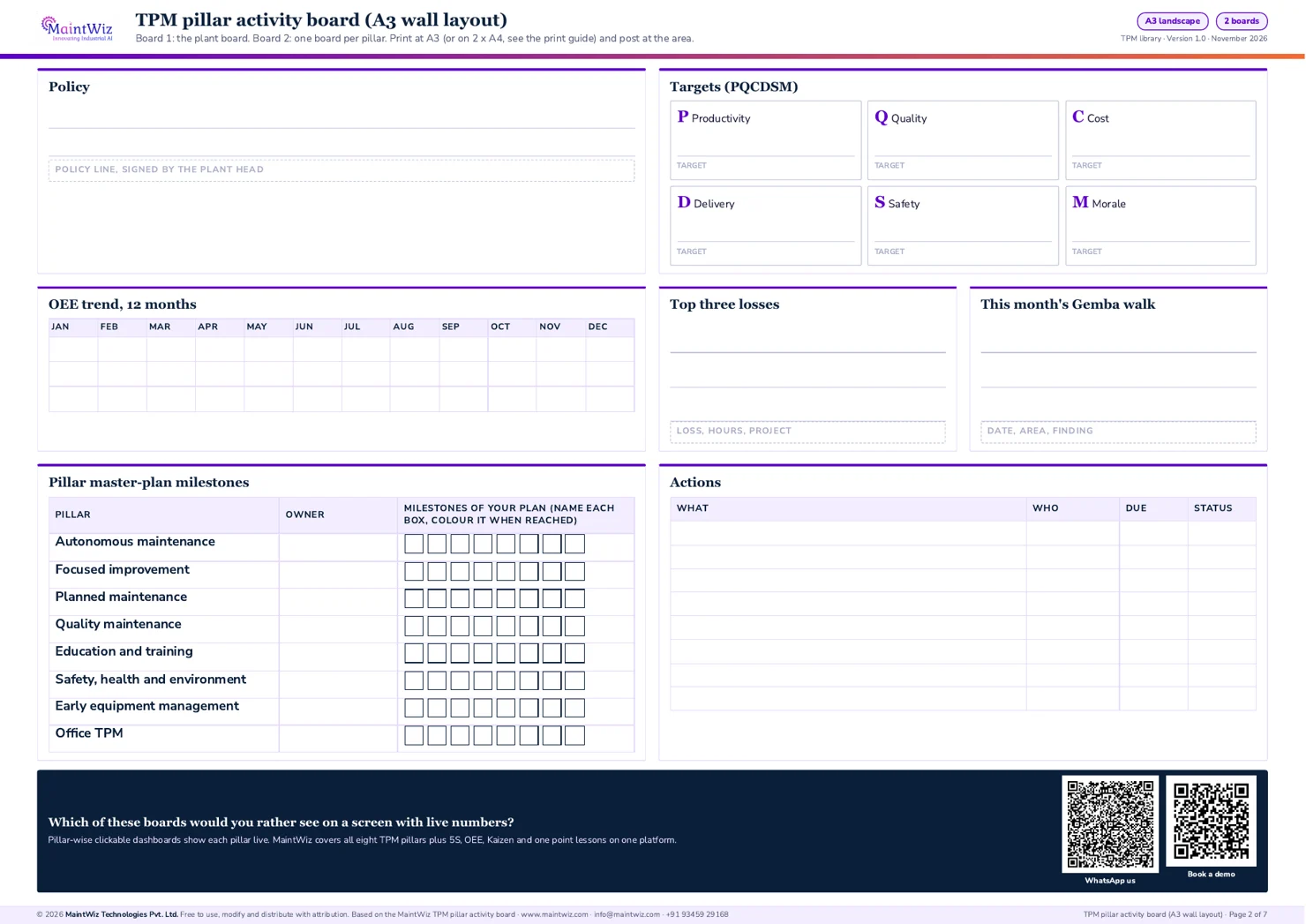
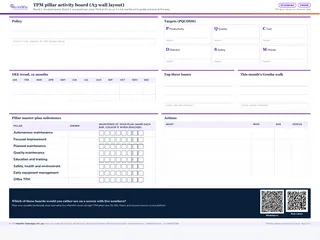 PDFTPM pillar activity board
Post one plant board and one pillar board with PQCDSM targets, the OEE trend, Gemba walk notes
- Pages
- 7
- A3 landscape (2 x A4 version inside)
- Created
- 5 November 2026
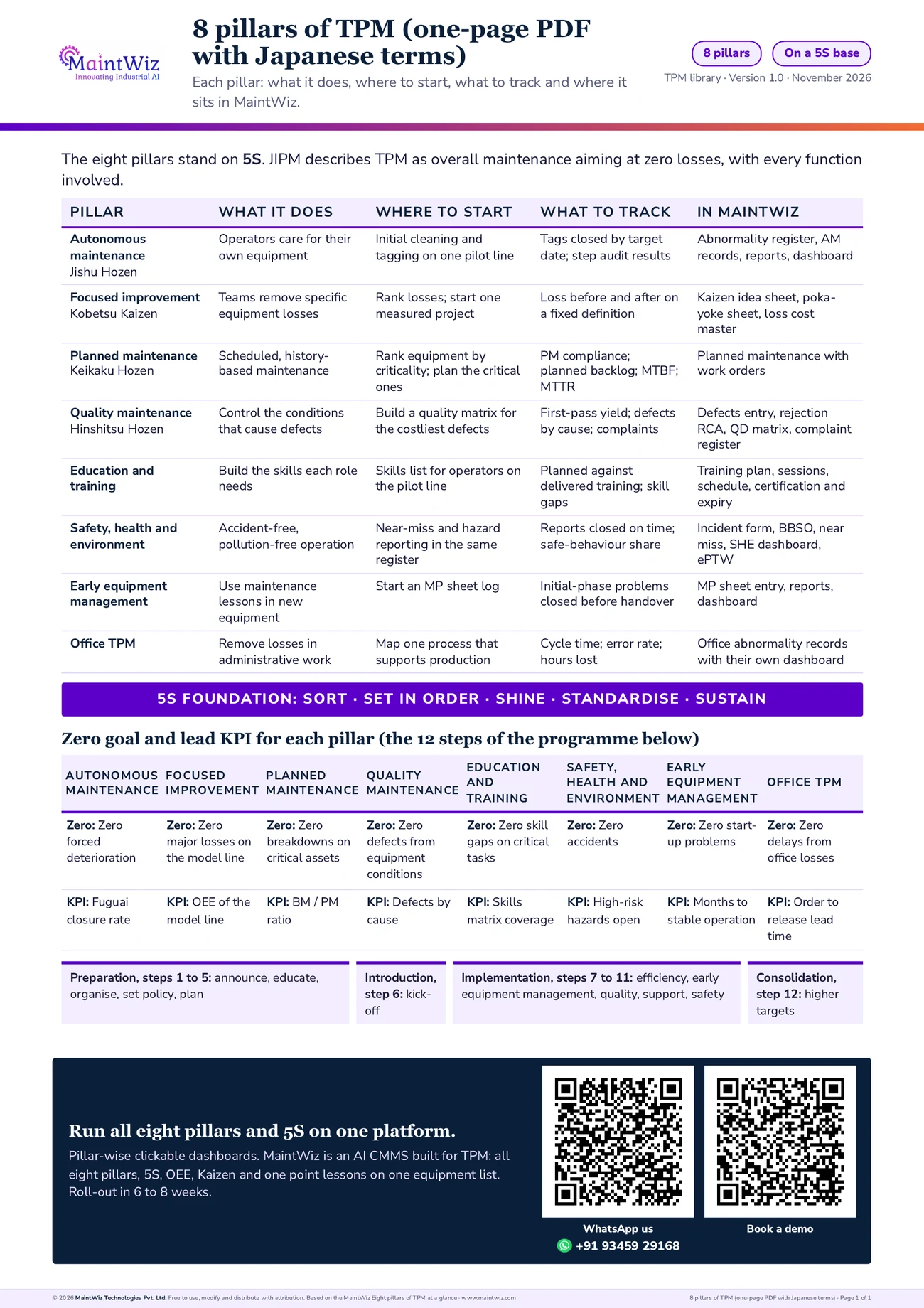
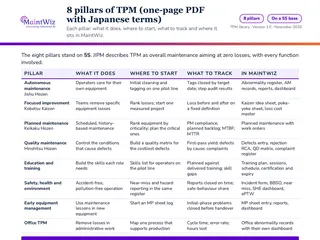 PDF8 pillars of TPM (one-page PDF with Japanese terms)
The eight pillars on one page with Japanese names, zero goal, lead KPI and where each sits in MaintWiz
- Pages
- 1
- A4
- Created
- 5 November 2026
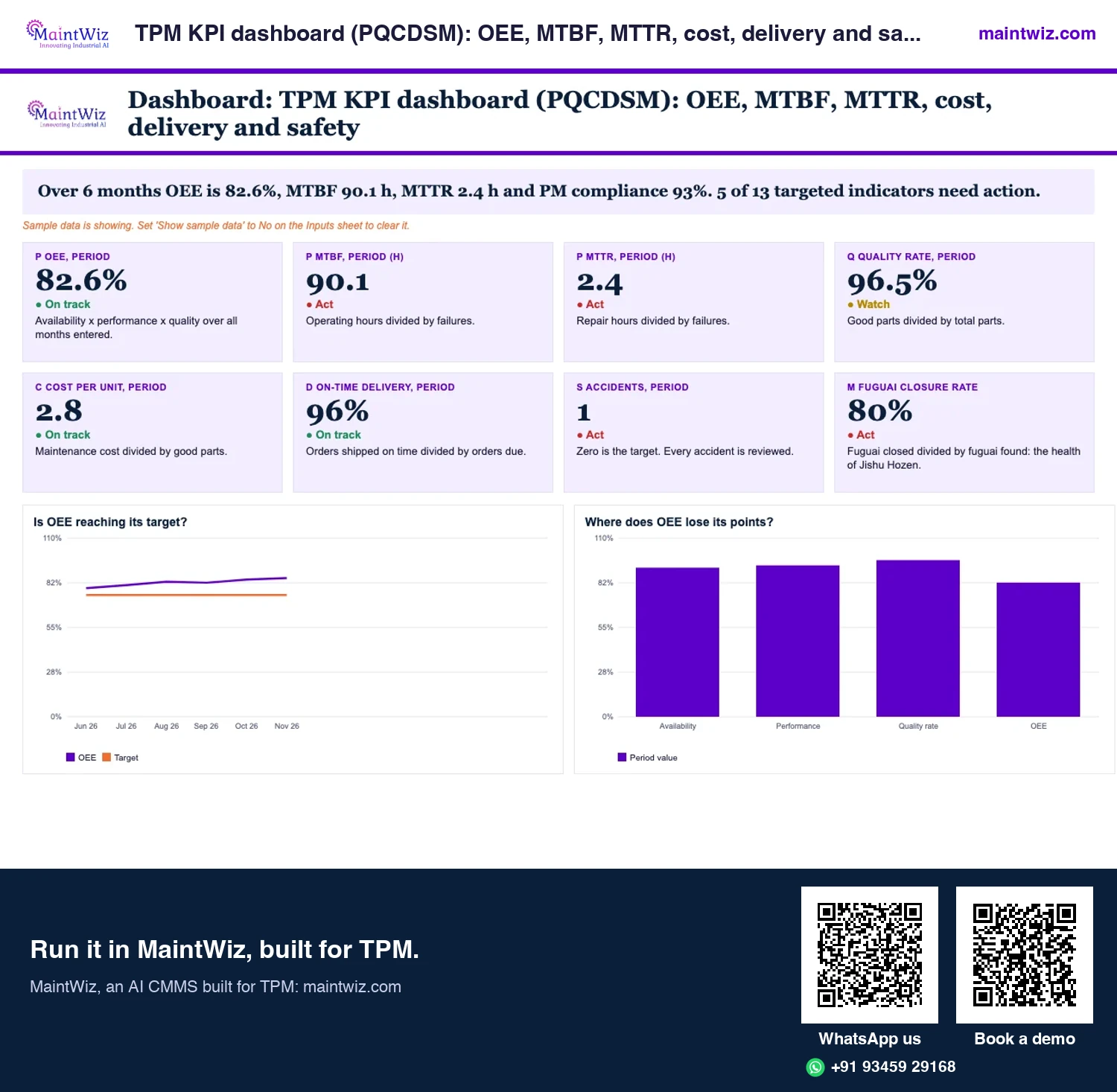
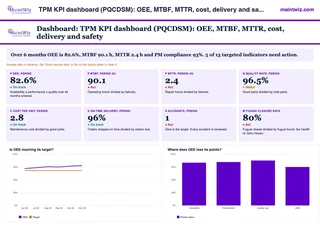 ExcelTPM KPI dashboard (PQCDSM): OEE, MTBF, MTTR, cost, delivery and safety
Track OEE, MTBF, MTTR, cost per unit, on-time delivery, safety and fuguai closure monthly against targets
- Sheets
- Dashboard, Inputs, Data, Targets, Read me
- A4
- Version
- v1.0, 2 November 2026
Digital TPM
What does digital TPM mean?
Digital TPM means running all eight pillars and the 5S foundation in one system instead of on paper and spreadsheets. Autonomous maintenance, focused improvement and Kaizen, planned maintenance, quality maintenance, education and training, safety, health and environment, early equipment management and office TPM each get their own records, owners, target dates and dashboard, and 5S audits sit beneath them on the same equipment list.
Operators raise tags on a phone, and tags convert to work orders; PM checklists are filled in the work order. Planned maintenance and calibration run on schedules, and OEE and losses roll up from equipment to line and plant. One point lessons, training and certification are tracked, incidents, near misses and permits to work are managed, and IoT signals can raise work orders automatically.
That puts leadership, training and 5S to work: managers see every pillar's status on its dashboard, training records sit with the people and equipment they concern, and 5S findings become actions with an owner and a date. You can start with routines and records on day one and connect IoT, MES, SCADA, PLC or DCS signals when you are ready (TPM digital transformation).
What do MaintWiz AI agents do for TPM?
MaintWiz AI agents run on your plant's own records (tags, work orders and losses) and generate a list of what needs to be watched. The agent proposes and your people approve, so every action keeps a named owner.
Which MaintWiz module runs each of the eight pillars?
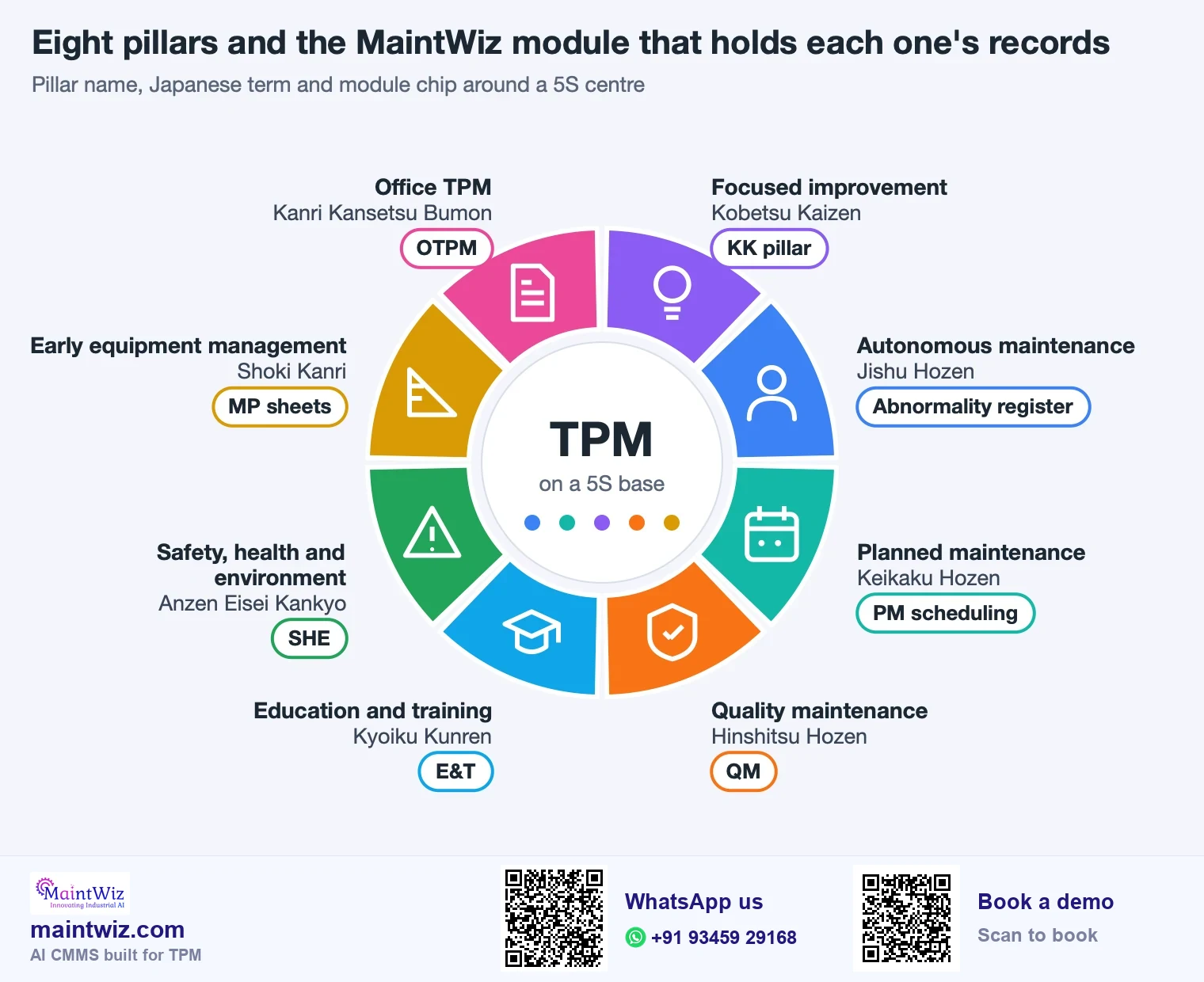
| Pillar | What the MaintWiz module runs | Open the module |
|---|---|---|
| Autonomous maintenance (Jishu Hozen) | Operator checklists and abnormality tags by colour, owner, target date and closure; tags convert to work orders; dashboard of open and closed tags and sources of contamination | Autonomous maintenance software |
| Focused improvement (Kobetsu Kaizen) | Loss master, production log, Kaizen idea sheet, poka-yoke sheet and loss cost master, with a Kaizen dashboard | Kaizen software |
| Planned maintenance (Keikaku Hozen) | Time, condition and event-based schedules, work orders, work bench, PM compliance reports, calibration and meter readings | Planned maintenance software |
| Quality maintenance (Hinshitsu Hozen) | Quality defect entry, rejection root-cause analysis, defect matrix, customer complaint register and a quality dashboard | Quality defect software |
| Education and training (Kyoiku Kunren) | Training plan, sessions, schedule and master, certification and expiry handling, and a training dashboard | Competency management software |
| Safety, health, environment | Incident reporting, behaviour-based safety, near-miss observations, EHS audits and permit to work (ePTW), with a safety dashboard | Near miss and BBSO software |
| Early equipment management (Shoki Kanri) | MP sheet entry, reports and a dashboard | Early equipment management software |
| Office TPM (Kanri Kansetsu Bumon) | Office abnormality tags with owners and actions, and an office TPM dashboard | Office TPM view and dashboard |
5S sits underneath: see 5S in TPM and 5S audit software.
By pillar
A pillar-by-pillar walk-through of the software
| Pillar | Operator or owner does | Others see |
|---|---|---|
| Autonomous maintenance | Runs the checklist, raises a tag | Tag owner, supervisor, maintenance planner |
| Focused improvement | Logs the loss, runs the project | Team, sponsor, finance |
| Planned maintenance | Completes PM work orders | Planner, supervisor, plant head |
| Quality maintenance | Enters defects, runs rejection RCA | Quality, production, maintenance |
| Education and training | Plans and records sessions | Supervisors, HR |
| Safety, health and environment | Reports near misses and observations | Safety lead, managers |
| Early equipment management | Writes MP sheets | Design and project engineers |
| Office TPM | Records office abnormalities and actions | Process owners, managers |
How are autonomous maintenance and abnormality tags handled?
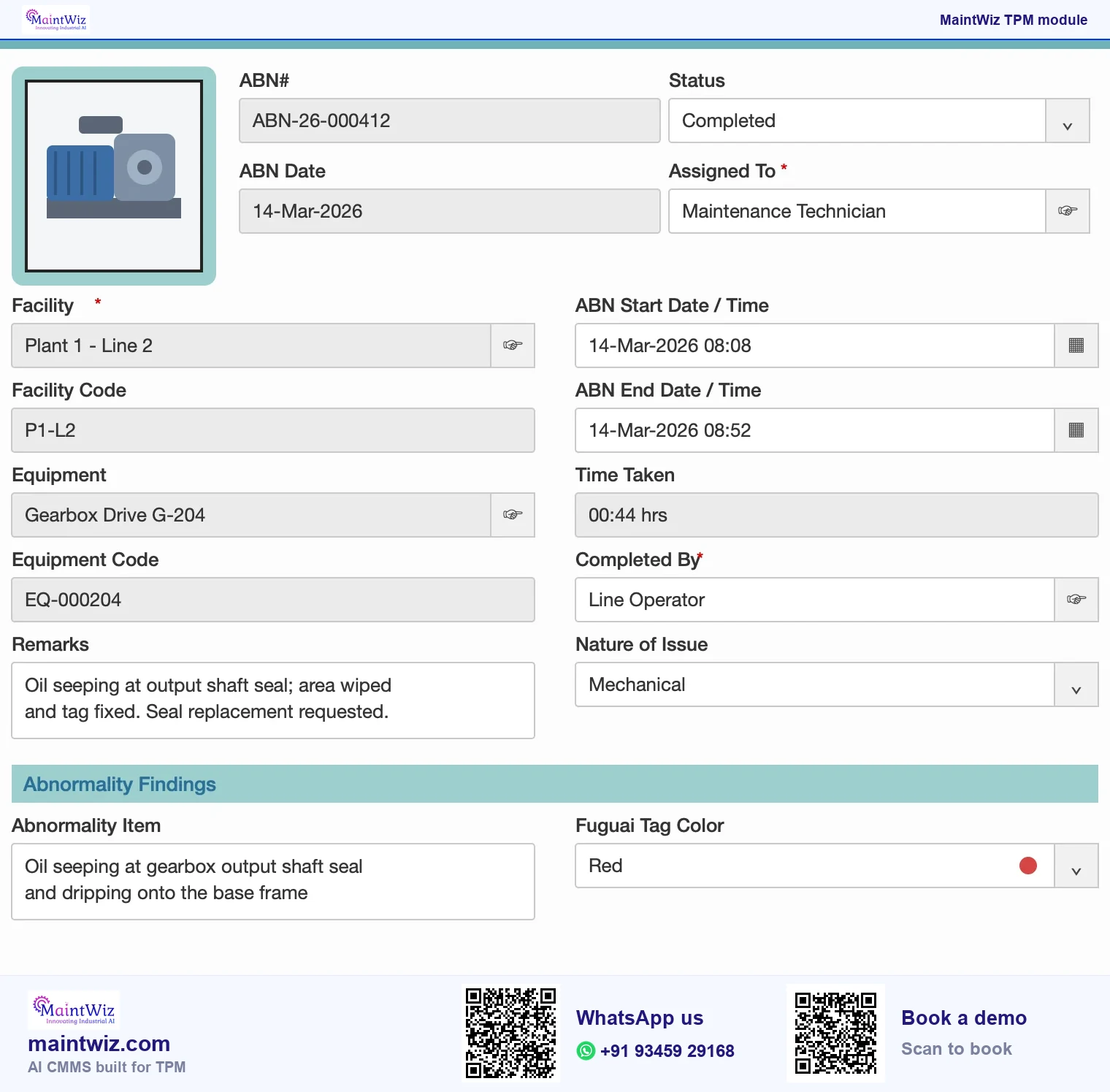
Operators clean, inspect and lubricate; what they find goes into an abnormality register with a tag colour, an owner, a target date and a closure. The Jishu Hozen dashboard shows red and white tag records, cumulative and day-wise closure and sources of contamination. Learn the method on the Jishu Hozen page and see abnormality management software. Autonomous maintenance vs preventive maintenance separates the checks that stay with operators from preventive maintenance tasks.
How are planned maintenance and work orders handled?
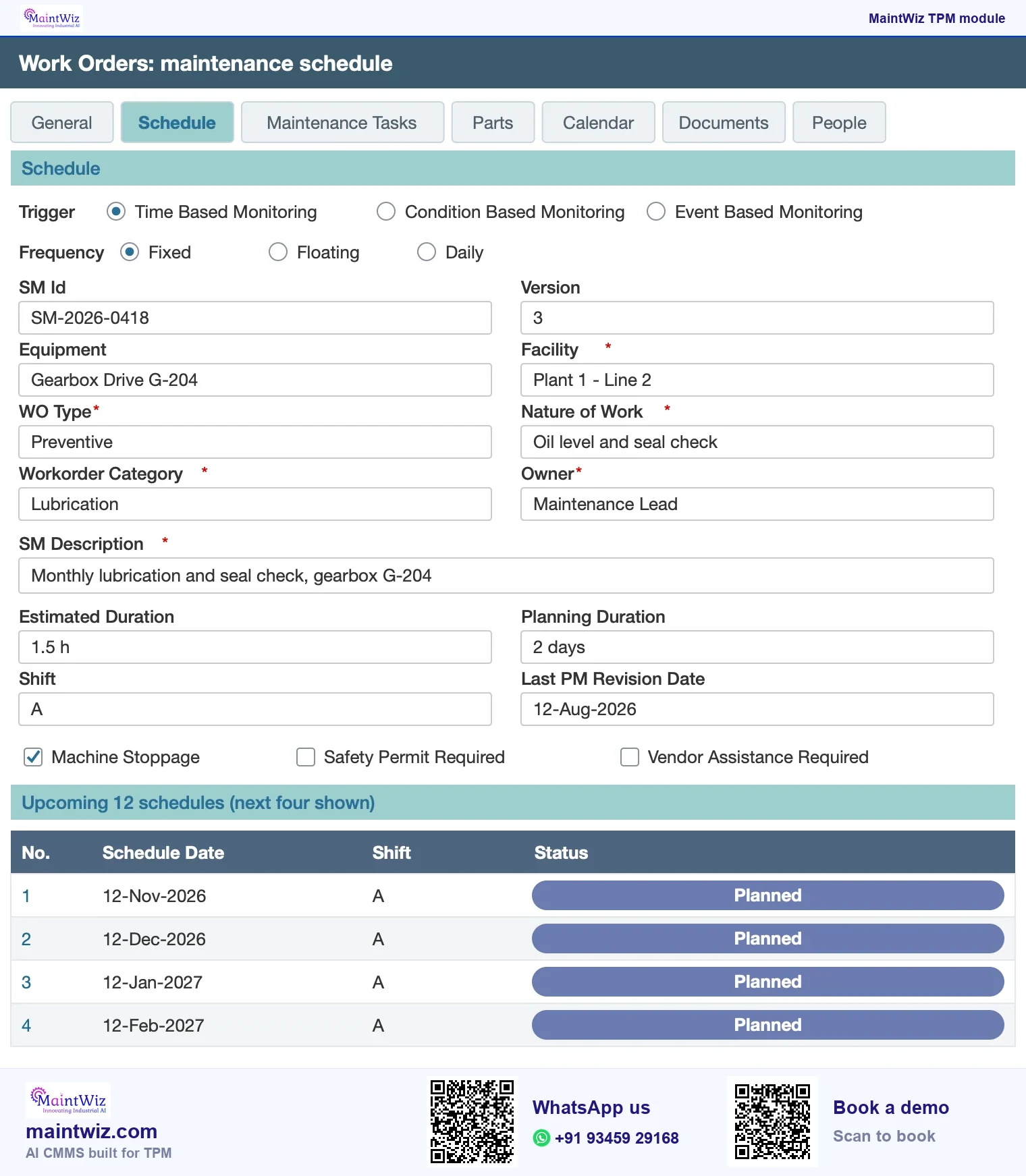
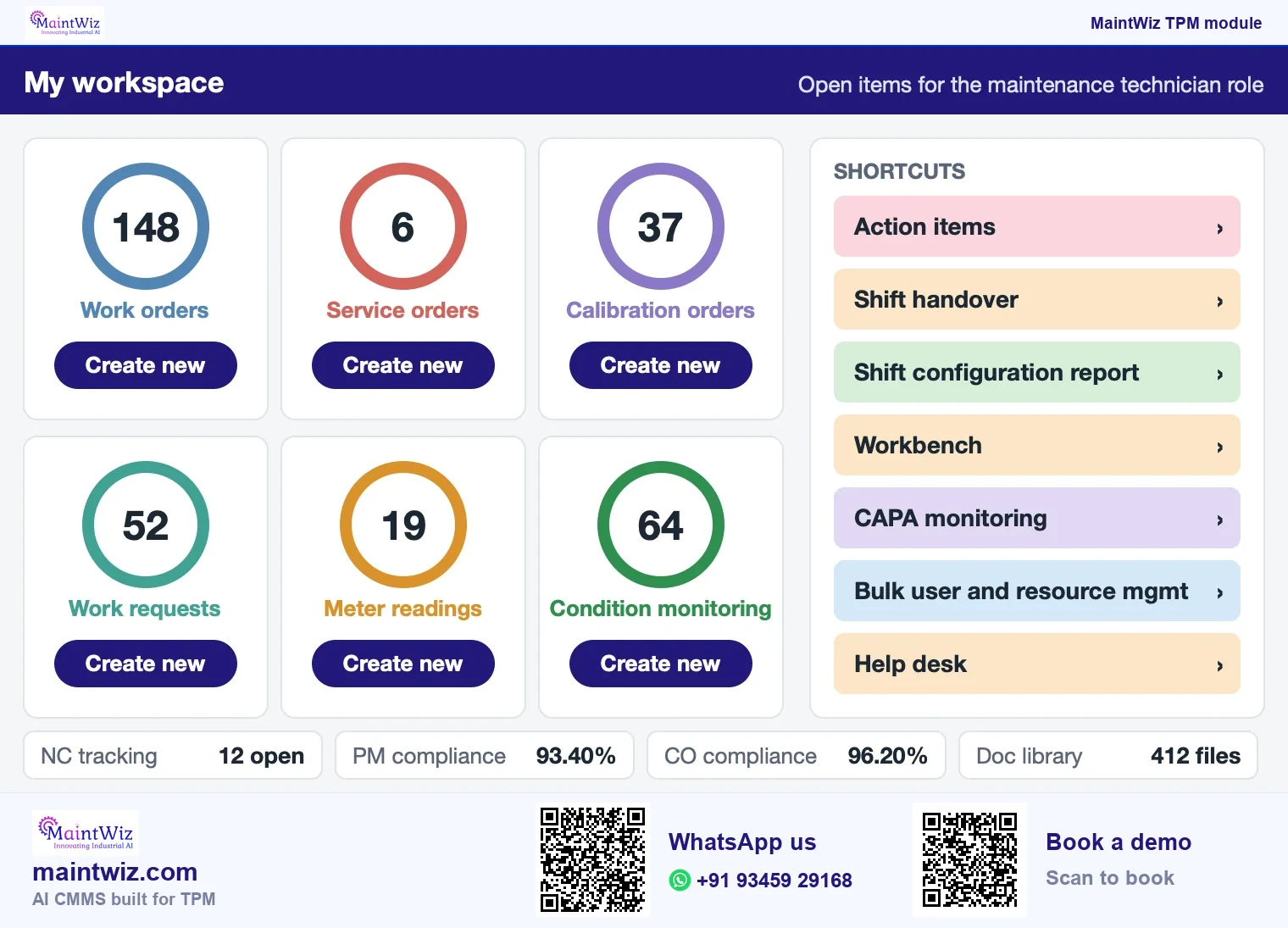
Planned maintenance has its own scheduling, management and monitoring and PM reports, with work orders and history in the same system as the other pillars, so a tag raised by an operator and a PM task on the same equipment are visible together. A tag can be converted to a work order after manual review, when maintenance work is needed. See planned maintenance in TPM (Figure 4).
OEE capture
How is OEE captured?
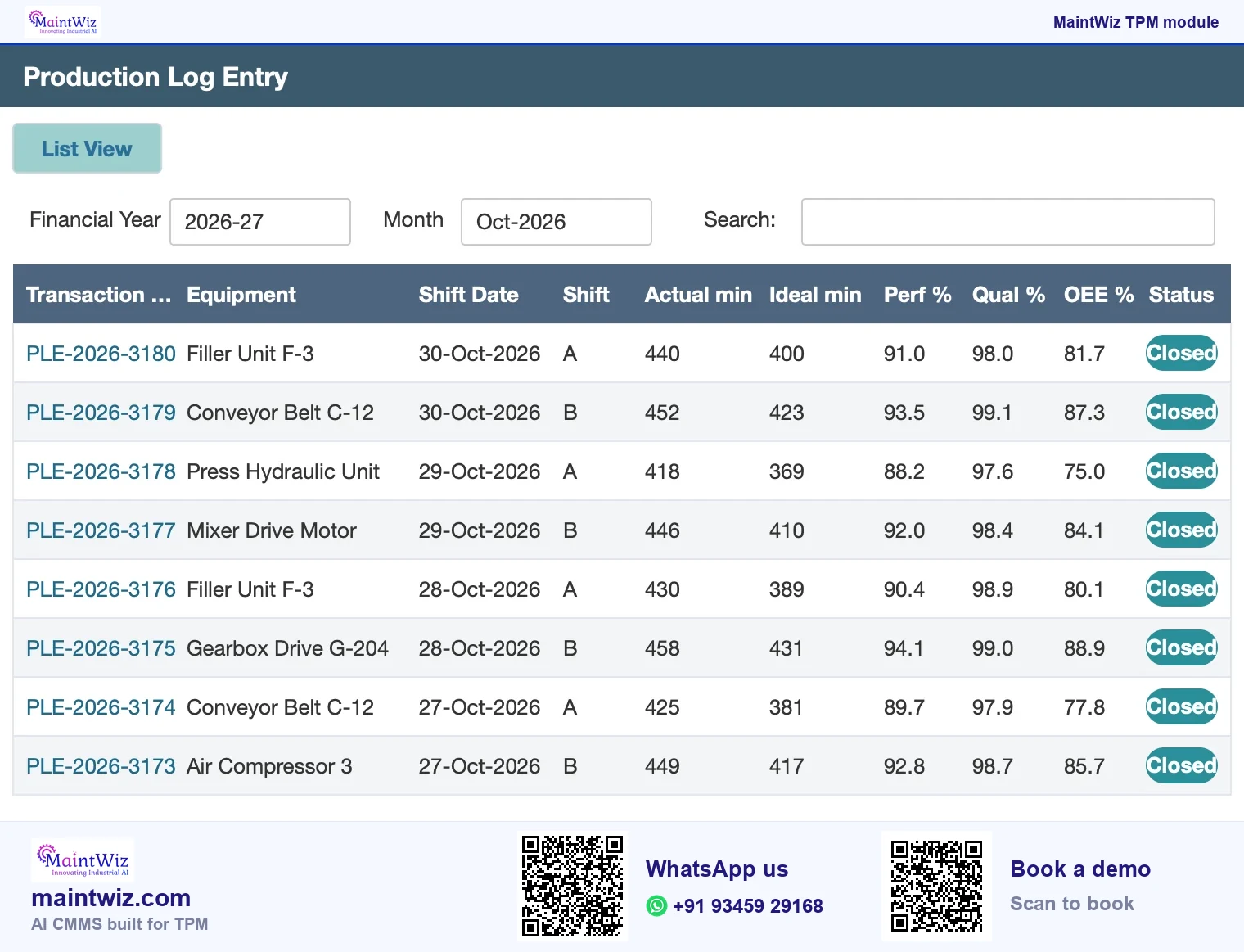
OEE is reported at equipment, line and plant level with loss stratification, trends and a lost-hours Pareto. Because what OEE software is comes down to stops, counts and planned time held per equipment, the same records serve OEE and the pillar teams. See OEE software and what is OEE. For OEE as a measure and TPM as a system, see the difference between OEE and TPM.
Audits, training records and the other pillars
5S audits are scored by zone with radar and top and low-score views; training plans and sessions are recorded with attendance; quality, safety and early-equipment records have their own screens. The TPM Central area holds goals, best practices and a repository for the programme.
Connections
How the pillars connect in practice
The pillars share records, which is why a system helps. Records sit on the same equipment list, so a team can follow an abnormality tag into a maintenance job, a repeat tag into a focused improvement project and a defect trend into a quality maintenance review. Stops recorded for OEE feed the loss ranking that decides which project comes next. Training records show whether the people who must act have the skill. Near misses and observations feed the safety pillar; design lessons are recorded on MP sheets for the next equipment.
- Tag to work order to closure: autonomous maintenance and planned maintenance.
- Loss ranking to project: OEE and focused improvement.
- Defect trend to condition standards: quality maintenance.
- Lessons from breakdowns to the next specification: early equipment management.
- Skills gap to training session: education and training.
Where paper breaks
Each link is a hand-off that breaks on paper when volumes grow; in MaintWiz the tag, the work order and the loss record sit on one equipment list.
Dashboards
What a TPM dashboard shows
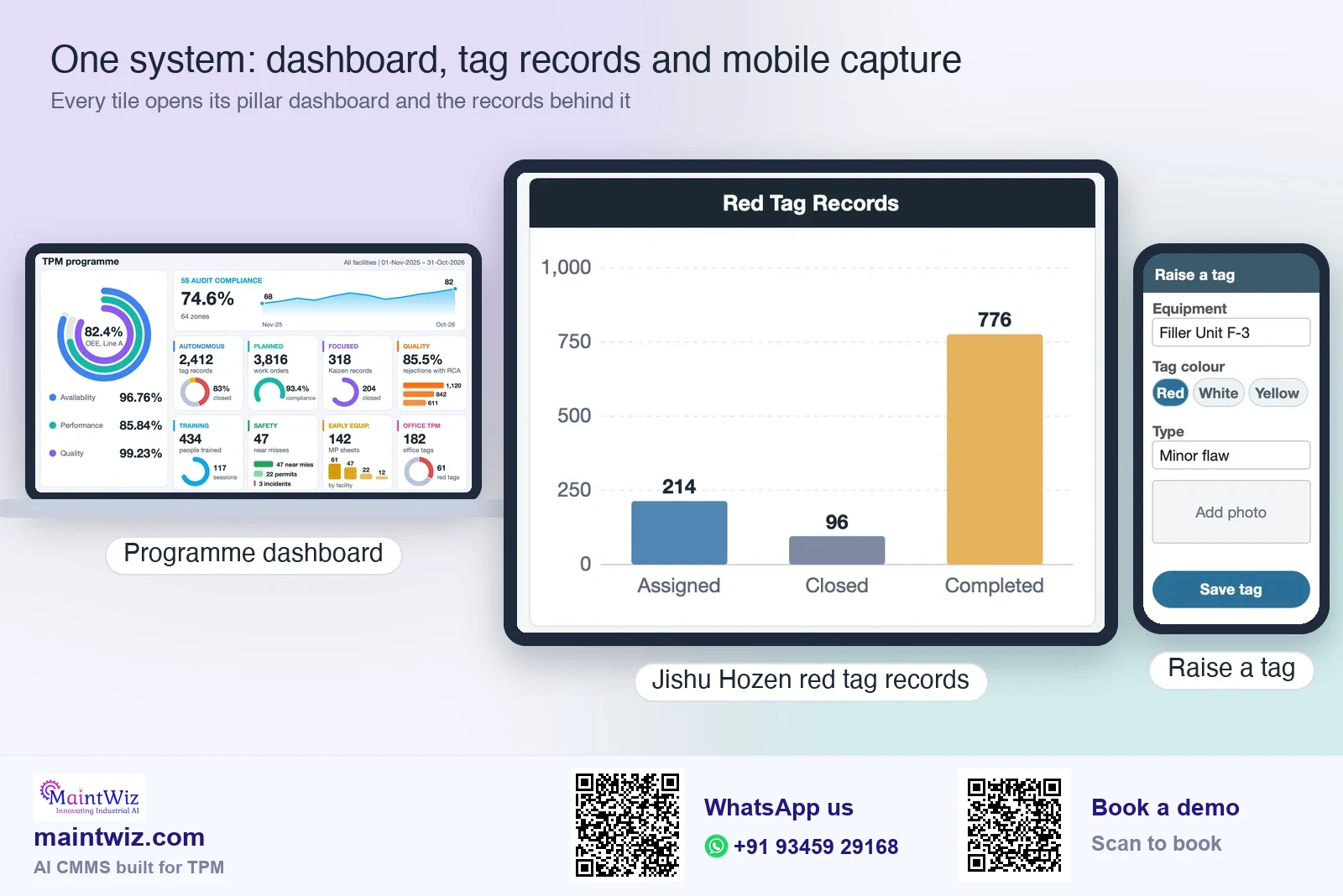
| Pillar or area | What the dashboard presents |
|---|---|
| Autonomous maintenance | Red and white tag records (assigned against completed), cumulative and day-wise closure, sources of contamination |
| Planned maintenance | PM schedule status, compliance, backlog |
| Safety, health and environment | Incident-reporting compliance; incidents by category |
| Quality | Rejection RCA compliance, rejections by facility, complaints by status, defects |
| Education and training | Sessions, completed hours, resources trained, attendance by role |
| 5S | Compliance by month, top and low scoring zones, best zone, radar by S |
| OEE | OEE with availability, performance and quality, daily trend, lost-hours Pareto, roll-up to line and plant |
What is a TPM system or TPM management system?
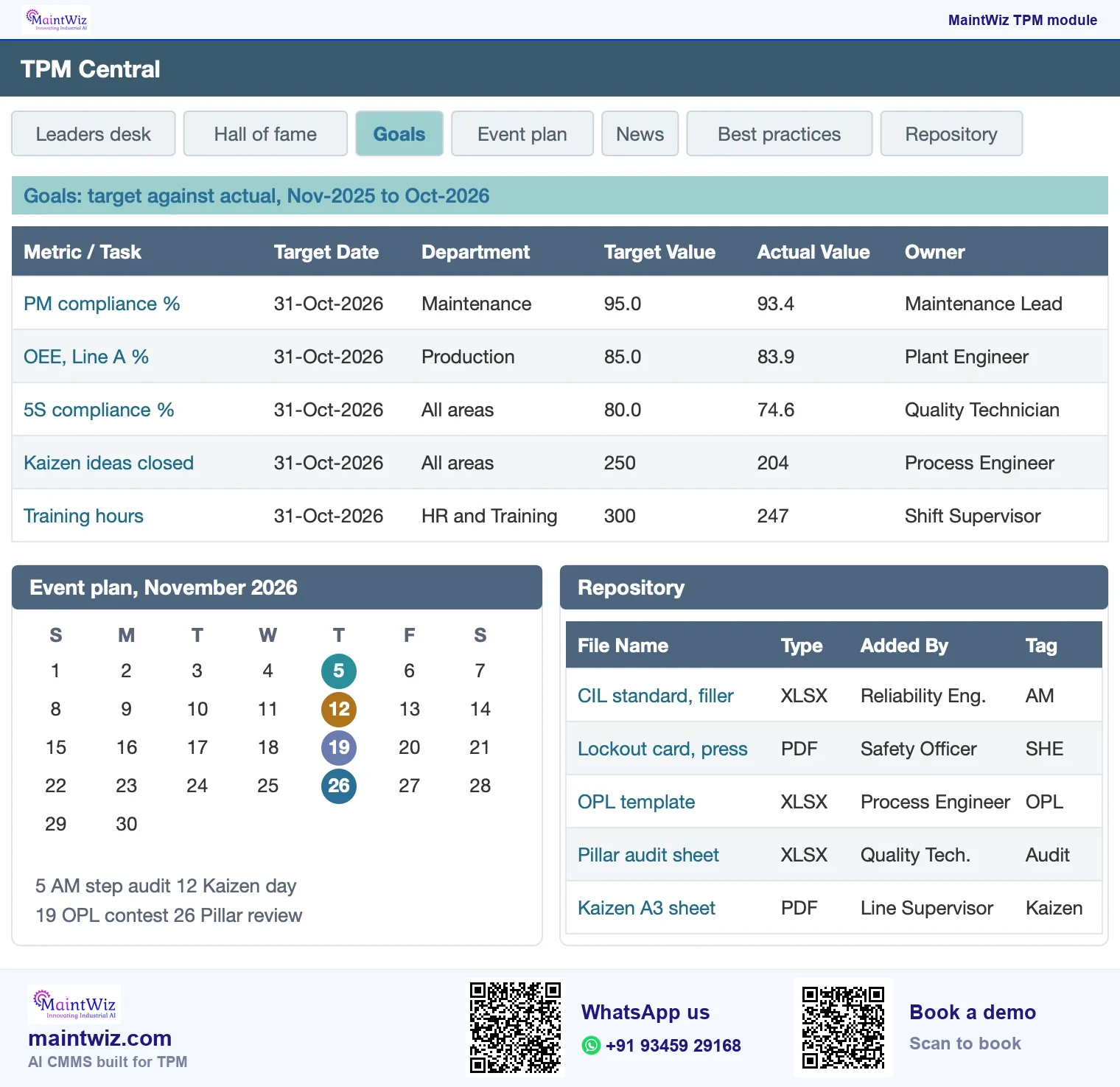
A TPM management system is the combination of routines, roles, records and review cadence that keeps TPM running, whether on paper or in software. The software part holds the records (tags, checklists, losses, audits, training) and the views (dashboards, reports). The management part is the steering group, pillar owners, master plan and review cycle.
Why plants move TPM from paper to a system
Paper and spreadsheets work at the start. They struggle when volumes grow: tags go missing, nobody sees what is overdue, audit scores sit in files, and OEE figures from different lines cannot be rolled up the same way. A shared system gives each item an owner and a date, shows what is open across the plant, and keeps history for the review.
- Abnormality tags get owners, dates and closure tracking.
- Step status per asset shows how far autonomous maintenance has progressed.
- Planned maintenance compliance and backlog are reported from the same records.
- OEE rolls up from equipment to line and plant on one definition.
- Audit scores and training records sit with the equipment and the people they concern.
The same records sit in the Jishu Hozen tags, 5S audits, OEE software, near miss and BBSO, Kaizen and training modules.
Paper, Excel or software
Paper, Excel or TPM software for TPM? How to decide
Start in the spreadsheet you have; MaintWiz loads your Excel lists through easy Excel uploads, so the work already done is kept when tags, audits or OEE outgrow it. TPM software takes over when TPM spreads to several lines, shifts or sites. Paper is where operators start at the machine; it is quick for a tag and cannot show what is overdue.
Excel holds a register well. Its limits show in four places: version control when several people keep copies, tracking what is overdue without someone reading every row, roll-up across lines and sites on one definition, and records that depend on the one person who built the file.
| Record or routine | Paper | Excel | TPM software (MaintWiz) |
|---|---|---|---|
| Records and ageing of tags | Tags on the machine; ageing seen by walking the line | A register; ageing needs a formula and someone to look | Every tag on one register by equipment, with overdue alerts for what has passed its target date |
| Ownership and due dates | Written on the tag | A column; no alert when a date passes | Each item has an owner and a target date; operators see their own area's open items |
| Audit scores roll-up | Sheets scored and filed | One workbook per area; roll-up by copy and paste | Scores held against the zone or pillar, with trends and actions |
| Losses and OEE definitions | Tally sheets keyed later | Formulas per line; definitions drift between copies | One loss list and one OEE definition; line and plant views show the roll-up of the equipment in scope |
| Training records | Attendance sheets | A skills matrix and plan per team | Sessions, attendance, hours, certification and expiry in one module |
| Multi-site view | Not possible without collation | Separate files per site, combined by hand | One equipment list; dashboards by pillar across areas and plants |
| SAP and plant-system links | None | Manual export and re-key | SAP PM and MM through web services; IoT, MES, SCADA, PLC and DCS sources can be connected |
| Mobile capture | Paper forms at the machine | The file opens on a phone but is awkward for tag entry | Operators capture records on mobile devices |
| Access control and edit rights | A locked cabinet | Whoever holds the file can edit any cell | Menus, roles and entitlements set per customer; enterprise single sign-on |
| Effort to set up and maintain | Lowest to start; highest to collate | Low to start; grows with every copy and every owner | Guided roll-out of the whole TPM in 6 to 8 weeks; Excel uploads for equipment and master data; XLS and PDF export |
Excel works while one person can see every row: one pilot area, a few tags a week, one OEE definition. Move to MaintWiz when several areas keep separate copies, tags go overdue unseen, lines disagree on OEE definitions, audit scores sit in files, or management wants one view across the plant.
MaintWiz is an AI CMMS built for TPM, and the move from Excel keeps the work you already did: equipment lists and master data load through easy Excel uploads, with guided project management from the MaintWiz implementation team. Start with the free Excel templates and the spreadsheet-to-system migration checklist, then use the TPM software buyer's guide to score what you see in a demo.
Learn the method behind each module
- Structure and measures: the eight pillars, TPM vs RCM, TPM KPIs and metrics and the TPM Excellence Award.
- Operator routine: steps 0 and 1, step 2, steps 4 and 5, steps 6 and 7, the red tag system and one point lessons, with the matching one point lesson software.
- Losses and OEE: the six big losses, the downtime reason-code library, the OEE calculator and how to improve OEE.
- Improvement: Kaizen sheet formats and P-M analysis for chronic losses.
TPM software for manufacturing: what to expect from the setup
- Menus, roles and entitlements are set up per customer, so each user sees what they need.
- Loss codes, tag categories and colours, audit checklists, training masters and report layouts are configured with the customer team.
- Equipment is registered with a hierarchy by plant, line and equipment; OEE roll-up follows that hierarchy.
- Dashboards and routines are reviewed with the implementation team through the roll-out.
Roll-out time
How long does a TPM roll-out with software take?
With MaintWiz the entire TPM can be rolled out in 6 to 8 weeks. Data loads through easy Excel uploads, and the MaintWiz implementation team gives guided project management: a project plan and milestones, module set-up and training (Figure 9).
A 6 to 8 week roll-out, week by week
Guided by the MaintWiz implementation team; data loads through easy Excel uploads
Week 1Week 2Week 3Week 4Week 5Week 6Week 7Week 8
Set-upConfigureTrain and go liveExtend and review
Kick-off and project plan
Excel upload: equipment list, master data
Modules set up with the MaintWiz team
Tag rules, reason codes and checklists agreed
Operator training on mobile capture
Live running in the pilot areas
Extension across areas and pillars
Dashboard review by pillar
SAP, IoT or MES connection, where needed
- Week 2: Data loaded
- Week 4: Routines ready
- Week 6: Operators trained and live
- Week 8: Roll-out complete
 maintwiz.comAI CMMS built for TPM
 WhatsApp us
 +91 93459 29168
 Book a demo
Roles and who reads which view
| Role | Typical view |
|---|---|
| Operator | Own checklist, own tags, own area's loss entries |
| Supervisor | Open tags and overdue routines for the shift or area |
| Maintenance planner | Work orders, PM compliance, backlog |
| Pillar owner | The pillar's dashboard and actions |
| Plant head | OEE and loss summary, tag ageing, audit trend, safety reports |
Roles and entitlements are set up with the customer, so the menus match how the plant works.
Common questions that decide where to start
- Do we have a written loss and OEE definition? If not, write it first.
- Which area has the most visible losses and a willing owner? Start there.
- Do operators have time in the shift for basic care? If not, negotiate it before launch.
- Who will own each pillar? Each owner gets the pillar's dashboard in MaintWiz.
- Is the asset register reliable enough to hold tags and work orders? Fix the worst gaps first.
Bring the answers to the demo: the MaintWiz implementation team turns them into the roll-out plan and loads the owners, loss codes and asset register by Excel upload.
Where to start
Where should you start?
- Check readiness with the TPM self-assessment.
- Run the operator routine with the autonomous maintenance checklist.
- Use the free TPM templates and tools for the pilot, then load them into MaintWiz by Excel upload, so the work already done is kept.
- Choose a system with the CMMS selection criteria and a staged implementation plan.
Modules, fields and tag colours are configured for your plant during the roll-out: book a demo to see your own scenario running.
Deployment
Deployment, mobile access, integrations and pricing
MaintWiz is delivered as public software as a service; on-premises deployment is available on request. Operators can capture records on mobile devices. MaintWiz integrates with SAP through the PM and MM modules using web services, can connect IoT, MES, SCADA, PLC and DCS sources, and supports enterprise single sign-on, each in use in live enterprise implementations. Records such as tags, observations, one point lessons and notes can be written in Hindi, Tamil or any other script, because MaintWiz supports Unicode; menus and labels are in English. Data can be exported to XLS and PDF.
Data loads from Excel templates, and the MaintWiz implementation team trains operators and owners during the roll-out. Pricing is quoted on request and tailored to the modules and users you need.
Next steps
Next steps
- Choosing software? Use the TPM software buyer's guide and see CMMS, MES and EAM for TPM: Which System Holds Which Record.
- Not sure where to start? Score your plant or read TPM implementation.
FAQ
Frequently asked questions
Can a CMMS run TPM?
Yes, when it runs each pillar's routine. MaintWiz does: a module and dashboard for each of the eight pillars on one equipment list, so every pillar's tags, audits and losses are reviewed together.
How do I start with digital TPM?
Check readiness, agree loss and KPI definitions and choose a pilot area. Load the equipment list into MaintWiz by Excel upload and raise tags there from the first week.
Do I need sensors or IoT for digital TPM?
No. Many plants start with operator entries on mobile and add machine data later where equipment can be instrumented. Where you add sensors, MaintWiz raises the work order automatically from the IoT signal.
What is a TPM dashboard?
A TPM dashboard presents the measures for each pillar in one view: tag records and closure, planned maintenance status, safety reports, quality records, training sessions, 5S scores and OEE with its losses, so the weekly review sees what is open and where the losses are.
When should a plant move from Excel to TPM software?
When several areas keep separate copies, tags go overdue unseen, lines define OEE differently, audit scores sit in files, or management wants one view across the plant. MaintWiz loads your Excel lists through easy Excel uploads, so the work already done is kept.
Is MaintWiz cloud-based or on-premises?
MaintWiz is delivered as public software as a service. Deployment on your own premises is available on request. The TPM modules are part of the same system, so the choice applies to all eight pillars together.
Can operators use the TPM modules on a phone?
Yes. Operators can capture records, such as raising an abnormality, on mobile devices. A tag raised this way can be converted to a work order after manual review, when maintenance work is needed.
What can MaintWiz integrate with?
MaintWiz integrates with SAP through the PM and MM modules using web services. It can connect IoT, MES, SCADA, PLC and DCS sources and supports enterprise single sign-on. Each of these is in use in live enterprise implementations.
How long does implementation take?
The entire TPM can be rolled out in 6 to 8 weeks, with guided project management from the MaintWiz implementation team: project plan, milestones, module set-up and training. Data loads from your existing Excel lists through easy Excel uploads.
How is MaintWiz priced?
Pricing is quoted on request and tailored to the pillars, sites and users in scope. Send those with your demo request and the quote comes back for exactly that scope.
Which TPM software covers Jishu Hozen, Kobetsu Kaizen and the other pillars?
MaintWiz is an AI CMMS built for TPM with a module for Jishu Hozen, Kobetsu Kaizen, Keikaku Hozen, Hinshitsu Hozen, Kyoiku Kunren, Anzen Eisei Kankyo, Shoki Kanri and Kanri Kansetsu Bumon (office TPM), plus 5S and OEE, all on one equipment list.
What do MaintWiz AI agents do for TPM?
MaintWiz AI agents run on your plant's own records, such as tags, work orders and losses, and generate a list of what needs to be watched. The agent proposes and your people approve, so every action keeps a named owner.
Sources
Sources
- JIPM, About TPM https://www.jipmglobal.com/about/tpm/
- JIPM, About TPM (pillars) https://jipmglobal.com/tpm/about_us_en